
FLX provides a JSON API for manipulating and serialising JSON. The implementation is based on Google’s GSON. For instance, the JsonObject class referred in this documentation is a class from GSON library: JsonObject.
JSON Form Component
FLX provides a dedicated JSON form component for creating JSON objects.

JSON Editor
To edit a JSON form component value, FLX provides a dedicated JSON Editor Bottom Sheet:
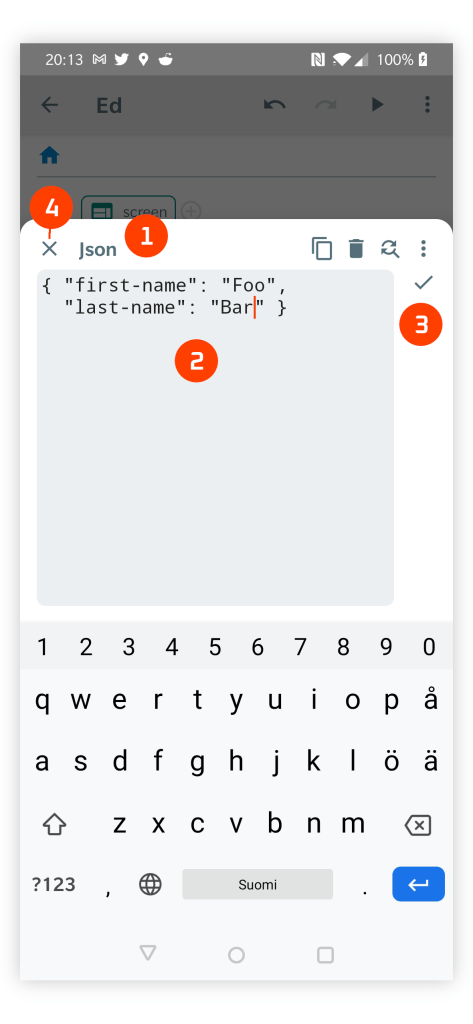
- JSON Editor Bottom Sheet
- The text view for editing JSON.
- Ok Button is enabled only for valid JSON.
- Close Button to exit the bottom sheet without modifying the JSON.
JSON API Functions

Tests if the given form is a JsonArray.
form– anAnyobject
Returns: a Boolean value

Tests if the given form is a JsonElement.
form– anAnyobject
Returns: a Boolean value

Tests if the given form is a JsonObject.
form– anAnyobject
Returns: a Boolean value

Tests if the given form is a JsonPrimitive i.e. a wrapper for basic type value, such as, an Int, a Float, or a String.
form– anAnyobject
Returns: a Boolean value

Reads the content of the given file to a JsonObject. See the File API page.
file– aFile
Returns: a JsonObject. If reading fails a Null is returned.

Converts the given jsonPrimitive to an Int. There are similar conversion functions for other primitive type values, e.g. (toFloatjsonPrimitive).
jsonPrimitive– aJSONPrimitive
Returns: An Int

Converts the given map collection object to JsonObject.
map– aMap
Returns: a JsonObject

Parses the given string to a JsonObject.
string– a valid JSONString
Returns: a JsonObject

Converts the given json to a Map.
json– aJsonObject
Returns: A Map

Gets the JSON value from the given httpResult object. See the HTTP API page.
httpResult– aHttpResultobject
Returns: a JsonObject

Write the given string to the given file. See the File API page.
file– aFilespecifying the output filestring– aStringto be written
Returns: a Boolean indicating if file writing succeeded.
 FLX - Visual Programming IDE App